Get in Touch

Getting set up

Installing the SDK

DIO SDK AI Integration Manual

Automated Android SDK integration using Claude Code AI Agent.

Overview

The DIO SDK Integration Agent automates the entire SDK integration process, reducing integration time from 2-4 hours to 10-20 minutes. The agent handles project analysis, dependency management, code generation, and build verification automatically.

Prerequisites

Before starting, ensure you have:

Installing Claude Code

# macOS / Linux (Homebrew)
brew install --cask claude-code

# macOS / Linux (curl)
curl -fsSL https://claude.ai/install.sh | bash

# Verify installation
claude --version

Installation

Option A: Quick Install (Recommended)

Run this command from any directory:

bash <(curl -fsSL https://raw.githubusercontent.com/displayio/DIOSDK/main/claude-agents/install.sh)

The agent will be installed globally to ~/.claude/agents/ and available in all projects.

Option B: Manual Download

  1. Download dio-ios-integrator.md from GitHub repository
  2. Place it in your project folder
  3. Ready to use

Usage

Step 1: Navigate to Your Project

cd /path/to/your/android/project

Step 2: Launch Claude Code

claude

Step 3: Request Integration

Use dio-ios-integrator.md to integrate DIO SDK.

Config:
- App ID: YOUR_APP_ID
- Placements:
  - Interstitial: PLACEMENT_ID
  - Banner: PLACEMENT_ID
  - InFeed: PLACEMENT_ID
  - Interscroller: PLACEMENT_ID
  - Inline: PLACEMENT_ID

Step 4: Wait for Completion

The agent will work autonomously for approximately 10-20 minutes. During this time it will:

  1. 🔍 Analyze your project structure
  2. 📦 Detect existing ad SDKs (AdMob, AppLovin, Unity Ads, etc.)
  3. ⬇️ Fetch latest DIO SDK version from Cocoapod or SPM
  4. 📝 Add dependencies
  5. 🔧 Create initialization and configuration classes
  6. 🔄 Implement waterfall strategy (DIO first → fallback)
  7. 🏗️ Build and auto-fix any errors
  8. ✅ Validate successful integration

Interscroller


Before You Start Make Sure:

Interscroller is a new ad unit, which combines the best elements of both Infeed and Interstitial ad units, in order to provide a unique, engaging user experience.

Interscroller enables you to insert an advertisement inside your app’s feed, while displaying ad-content in a fullscreen, in order to command higher CPM payouts.

The best performance can be reached using reveal effect and customizing colors of visible view-elements.

Interscroller ad unit supports both Video and Display (Static and Rich-Media) ad formats over portrait orientations.

  • Display and Rich Media ad size = 320×480
  • VAST Vertical Video ad size = 360×640

Interscroller is designed to be inserted into a UITableView or UIScrollView. Each Interscroller is associated with an UIView.

In order to get Interscroller UIView use:

[ad view];

Then insert the view into your ad’s placeholder or directly into the cell content viewSee the example:

   // TableView integration
UIView *view = [self.ad view];
if (cell.contentView.subviews.count > 0) 
       [cell.contentView.subviews[0] removeFromSuperview];
[cell.contentView addSubview:view];


   // ScrollView integration
UIView *view = [self.ad view];
[self.adsView addSubview:view];


// Recommended to set Interscroller height and/or top offset before request 
//to avoid any issues with dynamic UI elements
DIOPlacement *placement = [[DIOController sharedInstance] placementWithId:
                                                          self.placementId];

((DIOInterscrollerPlacement*)placement).interscrollerSize = 
                                             self.scrollView.frame.size.height;
((DIOInterscrollerPlacement*)placement).interscrollerOffset = [INT OFFSET];

When the UITableView requires the height of the row containing the Interscroller, you should return the UITableViewAutomaticDimension.

By default, the header of a Interscroller uses dark gray for background color and white for text. Also we recommend to change default background color to your custom, usually app main theme color. This can be changed as follows:

((DIOInterscrollerPlacement*)placement).headerBackgrounColor = [UIColor...];
((DIOInterscrollerPlacement*)placement).headerColor = [UIColor...];
((DIOInterscrollerPlacement*)placement).mainBackgrounColor = [UIColor...];

Default Interscroller height usually equal to table height. If you use any UI elements which can overlap ad’s view you may want to customise Interscroller height and top offset:

((DIOInterscrollerPlacement*)placement).interscrollerSize = YOUR_HEIGHT;
((DIOInterscrollerPlacement*)placement).interscrollerOffset = [YOUR_OFFSET];

You also can customise ad unit look and behaviour to improve UX:

((DIOInterscrollerPlacement*)placement).headerText = @"Sponsored";
((DIOInterscrollerPlacement*)placement).dynamicHeader = @YES; 
((DIOInterscrollerPlacement*)placement).showHeader = NO;
((DIOInterscrollerPlacement*)placement).reveal = NO;
((DIOInterscrollerPlacement*)placement).showTapHint = NO;
((DIOInterscrollerPlacement*)placement).headerText = @"Custom header";
((DIOInterscrollerPlacement*)placement).headerFont = [UIFont boldSystemFontOfSize:24];

In order to control Interscroller behavior in case of switching between screens:

  • Call [ad finish] to stop the ad and release the resources associated with it.
  • Call [ad leave] to pause the video ad.
  • Call [ad reenter] to resume the video ad.

Check the Sample App for a fully working example.

InRing Audio

Before You Start Make Sure:

The InRing Audio ad unit replaces the traditional ringback tone, engaging callers with a short, branded audio message while they wait for their call to connect.

To receive test ads during your integration please set Placement to status “Testing” in your display.io account

After finishing all the steps for receiving ad, save the reference to the Ad object to be able to play when required.

Ensure the ad object is cast to DIOInRing to use its specific methods.

DIOInRing* inRingAd = (DIOInRing*)ad;

To start the DIOInRing ad, call the play method:

[inRingAd play];

To pause the ad playback, use the pause method:

[inRingAd pause];

To completely close the InRingAudio ad instance, call the close method:

[inRingAd close];

Note: the default output method for InRing defined by global app’s setting. To switch the output to the speaker, use AVAudioSession. Example code how to switch between different output sources:

- (void)switchAudioToSpeaker {
    AVAudioSession *audioSession = [AVAudioSession sharedInstance];
    if (isSpeakerOn) {
        [audioSession setCategory:AVAudioSessionCategoryPlayAndRecord
                             withOptions:AVAudioSessionCategoryOptionDefaultToSpeaker
                                   error:nil];       
    } else {
        [audioSession setCategory:AVAudioSessionCategoryPlayAndRecord withOptions:
         AVAudioSessionCategoryOptionAllowBluetoothA2DP |
         AVAudioSessionCategoryOptionAllowBluetooth
                            error:nil];
    }
}

You may apply an AdEventHandler to register your callback for specific events.

[inRingAd setEventHandler:^(DIOAdEvent *event) {
    if (event.type == DIOAdEventOnAdStarted) {
     // onStartPlaying
     // integration code
  } else if (event.type == DIOAdEventOnFailedToShow) {
     // onFailedToPlay
     // integration code
  } else if (event.type == DIOAdEventOnAdCompleted) {
     // onCompletePlaying
     // integration code
  }
}];

An InRing ad may include a companion ad, typically in a Medium Rectangle (300×250) format. To display the companion ad in your app, retrieve it using the [ad view] method and insert it into your app’s view hierarchy. Note: companion ad view can be nullable in case companion ad is not available for the audio ad.

// Retrieve the companion ad view from the InRing ad
    UIView *bannerView = [self.ad view];
   // Ensure the companion ad is not already attached to another parent
    if (bannerView && !bannerView.superview) {
        bannerView.translatesAutoresizingMaskIntoConstraints = NO;
        [self.view addSubview:bannerView];

        [NSLayoutConstraint activateConstraints:@[
            [bannerView.topAnchor constraintEqualToAnchor:self.view.topAnchor constant:100],
            [bannerView.centerXAnchor constraintEqualToAnchor:self.view.centerXAnchor],
            [bannerView.widthAnchor constraintEqualToConstant:300],
            [bannerView.heightAnchor constraintEqualToConstant:250]
        ]];
    }

The Display.io SDK does not configure AVAudioSession for audio ads, as overriding the app’s existing audio settings could disrupt its functionality. Instead, the consuming app is responsible for managing the AVAudioSession to ensure a seamless audio experience.

Since the SDK does not enforce AVAudioSession configurations, it is up to the implementing application to set appropriate audio behavior. If an app needs to allow audio ads to continue playing during a call or alongside other media, it must explicitly configure the AVAudioSession settings.

To allow audio ads to continue playing during a call while respecting other app audio behaviors, developers can use the following configuration:

[[AVAudioSession sharedInstance] setCategory:AVAudioSessionCategoryPlayback
                                   withOptions:AVAudioSessionCategoryOptionDuckOthers
                                         error:nil];

 // AVAudioSessionCategoryPlayback ensures that the app’s audio continues playing even 
 // when the device is in silent mode
 // AVAudioSessionCategoryOptionDuckOthers lowers the volume of other audio sources when playing 
 // an ad instead of completely interrupting them

Inline


Before You Start Make Sure:

The Inline placement is a multi-unit ad solution. Inline placement is an advanced, unified advertising format that seamlessly combines Infeed, Interscroller, and Banner ads into a single solution. This hybrid approach enables publishers and advertisers to maximize their inventory’s efficiency while delivering engaging and non-intrusive ad experiences.

For a single ad request you can obtain the ad with the highest CPM available.

Inline placement is ideal for platforms with scrolling content, such as news apps, social media apps, and blogs. Its adaptive nature ensures compatibility across devices, making it a go-to solution for modern advertising strategies. By integrating multiple formats into one unit, Inline placement delivers flexibility, creativity, and effectiveness in a cohesive package.

After finishing all the steps for receiving ad, get UIView with Inline ad to desired container.

UIView *view = [self.ad view]; 
[self.adsView addSubview:view]; //insert ad view into your view hierarchy to impress the ad

Note: the size of the ad can vary between banner size (320×50), medium rect size (300×250) and fullscreen size. Do not place inline ads into limited size container unless you know the exact ad format for obtained ad.

You can still customize ads at the placement level, just as you would with a standard ad unit. Simply retrieve the sub-placement for the specific ad unit you want to modify and follow the relevant tutorial for customizing that particular ad unit. Example for Interscroller:

    DIOInterscrollerPlacement *placement = 
                          (DIOInterscrollerPlacement*)[[DIOController sharedInstance]
                                                      subPlacementWithId:placementId 
                                                      adUnit:INTERSCROLLER];

   ((DIOInterscrollerPlacement*)placement).headerText = @"Custom header";
  //customize header for interscroller ads, 
  //follow interscroller tutorial to reveal all the options

Here you can find working sample code for quick and easy integration.

Follow the link.

While working with the SDK, you can receive an NSError object in case of failure:

This NSError has a “domain” property that can be queried as follows:

if ([error.domain isEqualToString:@"DIOErrorDomain"]) {
    // Error specific to SDK
} else if ([error.domain isEqualToString:@"NSURLErrorDomain"]) {
    // Error specific to network
}

An error code can be obtained via:

error.code

If the domain of the NSError is “DIOErrorDomain”, the following enum is used:

typedef NS_ENUM(NSInteger, DIOErrorCode) {
    kDIOErrorMisc = 0,
    kDIOErrorNoDataSectionInResponse = 1,
    kDIOErrorNoPlacementsSectionInResponse = 2,
    kDIOErrorUnknownPlacementType = 3,
    kDIOErrorLoadingProviderMoreThanOnce = 4,
    kDIOErrorNoFill = 5,
    kDIOErrorNoAds = 6,
    kDIOErrorNoAd = 7,
    kDIOErrorAdUnavailable = 8,
    kDIOErrorParsing = 9
;

A text message can be obtained from the NSError via:

error.localizedDescription

The DisplayIO Google Ad Manager (GAM) Adapter enables publishers to mediate all display.io ad units with their GAM set up.

A. Getting Started

1. Add the adapter to your project:

target 'YourProjectName' do
 pod 'GAM-DIO-Adapter', '4.4.3'
end

Or manually download source and add required files from “DIOAdapterGoogleAds” to your project.

Optionally you can add GAM Adapter using SPM. Enter the repository URL: https://github.com/displayio/iOSMediationAdapters and choose GAM-DIO-Adapter product to be added to your target.

Follow our guide to install and initialize DisplayIO SDK.

B. GAM Setup Guide

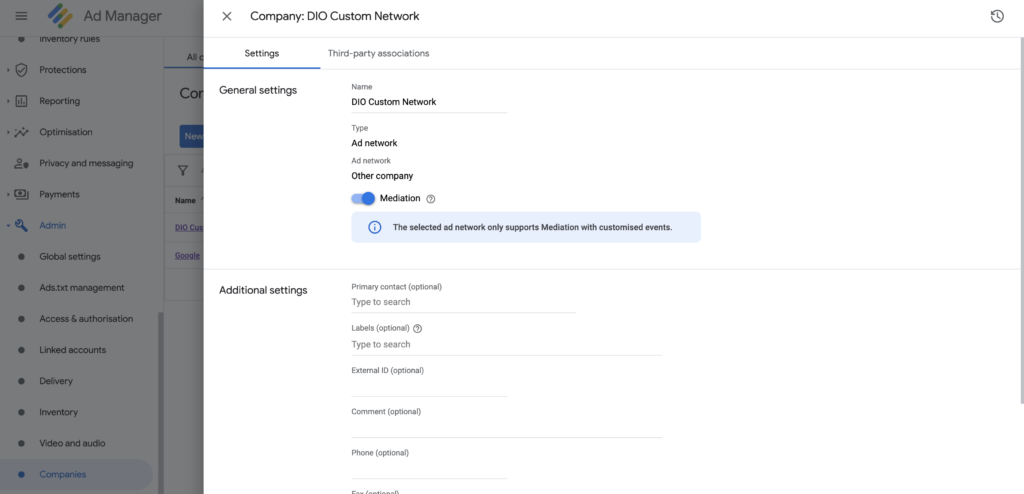
1. Navigate to “Admin” in your Google Ad Manager account

While in Admin create a “New Company” in the “Companies” section.
Choose type “Other company”, input the name “DisplayIO Custom Network” and turn on the “Mediation” toggle.

2. Create a New Yield Group

Select “Banner” for any inline or infeed ad unit or “Interstitial” for full screen ads.
Full Ad Unit Mapping Guide:

display.io       GAM
Interscroller    Banner              
Headline    Banner              
Interstitial    Interstitial              
Infeed    Banner              
Medium Rectangle    Banner              
Banner    Banner              


3. Add Yield Partner
Add DisplayIO as a yield partner in the Yield Group.
Then link the created Yield Group to the ad unit you wish GAM to mediate.
If you require more instruction on this please consult this Google Ad Manager reference or reach out to your display.io integration support specialist.

4. Add Yield Partner to Yield Group

Basic Inputs

Integration Type: “Custom Event”
Platform: “iOS”
Status: “Active”
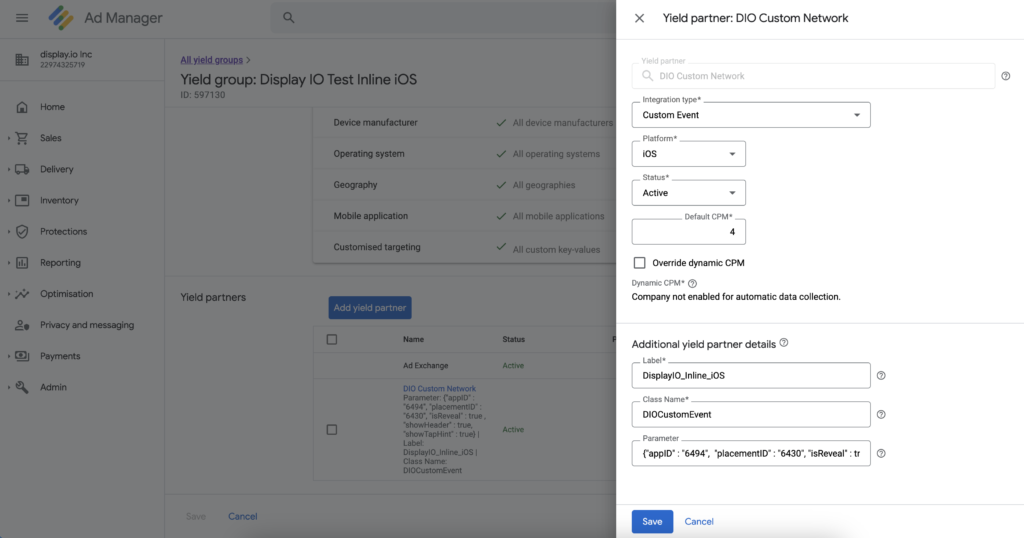
Default CPM: “100” (This number is just a placeholder, please consult your Display.io Account Manager for correct rate)

Additional Yield Partner Details

Define Custom Class Name:
DIOCustomEvent

Parameter:
Define JSON formatted string and replace parameters <APP_ID> and <PLACEMENT_ID>.

Both ID’s can be found in your display.io account or requested from your integration manager.

For Example:
{"appID" : "6494", "placementID" : "6430"}

5. Create a new ad unit

Specify the newly created DisplayIO network as a source and ensure the auto-refreshing option is disabled. Set DisplayIO network as priority over all other sources including Google.

6. Traffic Ad Unit
Follow the Banner or Interstitial tutorials in order to get ads from Google Ad Manager.

7.  Use Adaptive Banner tutorial to implement Interscroller ad unit.

//Interscroller requires full width banner view
GADAdSize adSize = GADCurrentOrientationInlineAdaptiveBannerAdSizeWithWidth(self.view.frame.size.width);
self.bannerView = [[GAMBannerView alloc] initWithAdSize:adSize];

C. Advanced Ad Unit Customization

1. Customizing the user experience of Interscroller 

Interscroller contains a ‘reveal’ or parallax user experience when scrolled. This is set to “True” by default and it is recommended to maintain this experience.

However you can chose to turn off these behaviors using the following method

For example:
{"appID" : "6494", "placementID" : "6430", "isReveal" : false , "showHeader" : false, "showTapHint" : false}

2. Customize Interscroller on placement level

To customize Interscroller ad unit on placement level retrieve Placement object after DIO SDK initialization:

DIOPlacement *placement = [[DIOController sharedInstance] placementWithId:@"YOUR_PLACEMENT_ID"];

iOS AdMob Mediation Adapter

iOS AdMob Mediation Adapter supports all display.io Ad Units.

AdMob/ display.io ad units mapping:

display.io       AdMob
          Interscroller    Banner              
Interstitial    Interstitial              
Infeed    Banner              
Medium Rectangle    Banner              
Banner    Banner              

To set it up:

1. Add the adapter to your project:

target 'YourProjectName' do
 pod 'GAM-DIO-Adapter', '4.4.3'
end

Or download source and add required files from “Classes” to your project.

2. Create a Google AdMob account and register an app

3. Use Quick Start guide to setup AdMob SDK

4a. Interstitial: create a mediation group for Interstitial / iOS

  • Add an ad unit;
  • Cancel Real-time eCPM for Admob network;
  • Add custom event: In “Class Name” enter DIOInterstitialAdapter and in “Parameter” enter the relevant Placement ID.

4b. Banner: create a mediation group for Banner / iOS

  • Add an ad unit;
  • Cancel Real-time eCPM for Admob network;
  • Add custom event: In “Class Name” enter DIOBannerAdapter and in “Parameter” enter the relevant Placement ID.

4c. Medium Rectangle: create a mediation group for Banner / iOS

  • Add an ad unit;
  • Cancel Real-time eCPM for Admob network;
  • Add custom event: In “Class Name” enter DIOMediumRectangleAdapter and in “Parameter” enter the relevant Placement ID.

4d. Infeed: create a mediation group for Infeed/ iOS

  • Add an ad unit;
  • Cancel Real-time eCPM for Admob network;
  • Add custom event: In “Class Name” enter DIOInFeedAdapter and in “Parameter” enter the relevant Placement ID.

4e. Interscroller: create a mediation group for Interscroller/ iOS

  • Add an ad unit;
  • Cancel Real-time eCPM for Admob network;
  • Add custom event: In “Class Name”enter DIOInterscrollerAdapter and in “Parameter” enter the relevant Placement ID.

5. Disable the automatic-refresh in AdMob ad unit settings (under advanced settings).

6. Initialize DIO SDK and start AdMob SDK:

[[DIOController sharedInstance] initializeWithProperties:nil appId:@"<YOUR APP ID>" completionHandler:^{
 // DIO initialized
 [[GADMobileAds sharedInstance] startWithCompletionHandler:^(GADInitializationStatus *_Nonnull status){
 // GAD started
 }];
} errorHandler:^(NSError *error) {
 // Failure
}];

6a. Get Interstitial ads from AdMob based on tutorial.

6b. Get Banner ads from AdMob based on tutorial.

6c. Get Medium Rectangle ads from AdMob based on tutorial

6d. Get Infeed ads from AdMob based on the following:

#import <GoogleMobileAds/GoogleMobileAds.h>
#import <DIOSDK/DIOController.h>
@interface TableViewController () <GADBannerViewDelegate>
@property(nonatomic, strong) GADBannerView *bannerView;
@end

@implementation TableViewController
- (void)viewDidLoad {
    [super viewDidLoad];
    self.navigationController.navigationBar.translucent = NO;    

    [self.tableView registerClass:[UITableViewCell class] forCellReuseIdentifier:@"Cell1"];
    [self.tableView registerClass:[UITableViewCell class] forCellReuseIdentifier:@"Cell2"];

    self.bannerView = [[GADBannerView alloc] initWithAdSize:kGADAdSizeMediumRectangle];
    self.bannerView.delegate = self;
    self.bannerView.adUnitID = @"<YOUR_AD_UNIT_ID>";
    self.bannerView.rootViewController = self;

    dispatch_async(dispatch_get_main_queue(), ^{
        GADRequest *request = [GADRequest request];
        request.testDevices = @[kGADSimulatorID];
        [self.bannerView loadRequest:request];
    });
}

- (void)viewWillDisappear:(BOOL)animated {
    [super viewWillDisappear:animated];
    [[DIOController sharedInstance] finishAllAds];
}

- (NSInteger)tableView:(UITableView *)tableView numberOfRowsInSection:(NSInteger)section {
  return 30;
}

- (UITableViewCell *)tableView:(UITableView *)tableView cellForRowAtIndexPath:(NSIndexPath *)indexPath {
    if (indexPath.row == 15) {
        UITableViewCell *cell = [tableView dequeueReusableCellWithIdentifier:@"Cell1" forIndexPath:indexPath];
        cell.selectionStyle = UITableViewCellSelectionStyleNone;   

        if (cell.contentView.subviews.count > 0) [cell.contentView.subviews[0] removeFromSuperview];
        [cell.contentView addSubview:self.bannerView];        

        self.bannerView.translatesAutoresizingMaskIntoConstraints = NO;
        [cell.contentView.leadingAnchor constraintEqualToAnchor:self.bannerView.leadingAnchor].active = YES;
        [cell.contentView.trailingAnchor constraintEqualToAnchor:self.bannerView.trailingAnchor].active = YES;
        [cell.contentView.topAnchor constraintEqualToAnchor:self.bannerView.topAnchor].active = YES;
        [cell.contentView.bottomAnchor constraintEqualToAnchor:self.bannerView.bottomAnchor].active = YES;
      
        return cell;
    }    

    UITableViewCell *cell = [tableView dequeueReusableCellWithIdentifier:@"Cell2" forIndexPath:indexPath];
    cell.selectionStyle = UITableViewCellSelectionStyleNone;
    cell.textLabel.text = @"Simple Cell";  

    return cell;
}

/*
 * For infeed, use the following:
 */

- (CGFloat)tableView:(UITableView *)tableView heightForRowAtIndexPath:(NSIndexPath *)indexPath {
    if (indexPath.row == 15) {
        CGFloat ratio = 300 / 250.0;     

        if (CGRectGetHeight(self.tableView.frame) < CGRectGetWidth(self.tableView.frame)) {
            return CGRectGetHeight(self.tableView.frame) / ratio;
        } else {
            return CGRectGetWidth(self.tableView.frame) / ratio;
        }
    }
   
    return UITableViewAutomaticDimension;
}

@end

6e. Get Interscroller ads from AdMob based on the following:

UITablevView integration:

#import "InterscrollerViewController.h"
#import <GoogleMobileAds/GoogleMobileAds.h>
#import <DIOSDK/DIOController.h>
#import <DIOSDK/DIOInterscrollerView.h>
#import "DIOInterscrollerAdapter.h"

@interface InterscrollerViewController () <GADBannerViewDelegate>
@property(nonatomic, strong) GADBannerView *bannerView;
@end

@implementation InterscrollerViewController

DIOInterscrollerView *dioView;

- (void)viewDidLoad {
    [super viewDidLoad];
    self.navigationController.navigationBar.translucent = NO;
    [self.tableView registerClass:[UITableViewCell class] forCellReuseIdentifier:@"Cell1"];
    [self.tableView registerClass:[UITableViewCell class] forCellReuseIdentifier:@"Cell2"];
    
    self.bannerView = [[GADBannerView alloc] initWithAdSize:kGADAdSizeMediumRectangle];
    self.bannerView.delegate = self;
    self.bannerView.adUnitID = @"ca-app-pub-1186601170998955/8184589468";
    self.bannerView.rootViewController = self;

    dispatch_async(dispatch_get_main_queue(), ^{
        GADRequest *request = [GADRequest request];
        [self.bannerView loadRequest:request];
    });
}

- (void)viewWillDisappear:(BOOL)animated {
    [super viewWillDisappear:animated];
    [[DIOController sharedInstance] finishAllAds];
}

- (void)bannerViewDidReceiveAd:(nonnull GADBannerView *)bannerView{
    dioView = [DIOInterscrollerAdapter getInterscrollerViewForTableView:bannerView
                                            withInterscrollerSize:CGSizeMake(self.view.frame.size.width, self.view.frame.size.height)
                                            withBaseSize:kGADAdSizeMediumRectangle];
}

- (NSInteger)numberOfSectionsInTableView:(UITableView *)tableView {
    return 1;
}

- (NSInteger)tableView:(UITableView *)tableView numberOfRowsInSection:(NSInteger)section {
    return 39;
}

- (UITableViewCell *)tableView:(UITableView *)tableView cellForRowAtIndexPath:(NSIndexPath *)indexPath {
    if (indexPath.row > 0 && indexPath.row % 20 == 0) {
        UITableViewCell *cell = [tableView dequeueReusableCellWithIdentifier:@"Cell1" forIndexPath:indexPath];
        cell.selectionStyle = UITableViewCellSelectionStyleNone;
        [cell.contentView addSubview:self.bannerView];
        [cell.contentView.leadingAnchor constraintEqualToAnchor:self.bannerView.leadingAnchor].active = YES;
        [cell.contentView.trailingAnchor constraintEqualToAnchor:self.bannerView.trailingAnchor].active = YES;
        [cell.contentView.topAnchor constraintEqualToAnchor:self.bannerView.topAnchor].active = YES;
        [cell.contentView.bottomAnchor constraintEqualToAnchor:self.bannerView.bottomAnchor].active = YES;
        return cell;
    }

    UITableViewCell *cell = [tableView dequeueReusableCellWithIdentifier:@"Cell2" forIndexPath:indexPath];
    cell.selectionStyle = UITableViewCellSelectionStyleNone;
    cell.textLabel.text = @"Simple Cell";
    return cell;
}

- (CGFloat)tableView:(UITableView *)tableView heightForRowAtIndexPath:(NSIndexPath *)indexPath {
    return UITableViewAutomaticDimension;
}

@end

UIScrollView integration:

@implementation InterscrollerScrollViewController

- (void)viewDidLoad {
    [super viewDidLoad];
    self.navigationController.navigationBar.translucent = NO;
    self.bannerView = [[GADBannerView alloc] initWithAdSize:kGADAdSizeMediumRectangle];
    self.bannerView.delegate = self;
    self.bannerView.adUnitID = @"ca-app-pub-1186601170998955/8184589468";
    self.bannerView.rootViewController = self;
    [self.adsView addSubview:self.bannerView];

    dispatch_async(dispatch_get_main_queue(), ^{
        GADRequest *request = [GADRequest request];
        [self.bannerView loadRequest:request];
    });
}

- (void) viewWillDisappear:(BOOL)animated {
    [super viewWillDisappear:animated];
    [[DIOController sharedInstance] finishAllAds];
}

- (void)bannerViewDidReceiveAd:(nonnull GADBannerView *)bannerView{
        self.dioView = [DIOInterscrollerAdapter getInterscrollerViewForScrollView:bannerView
                                               withInterscrollerSize:CGSizeMake(self.scrollView.frame.size.width, self.scrollView.frame.size.height)
                                                        withBaseSize:kGADAdSizeMediumRectangle];
}

- (void)close:(id)sender {
    [self dismissViewControllerAnimated:YES completion:nil];
}

@end

In order to stop Infeed or Interscroller ads, and release all the resources associated with it (for example when leaving the screen) call:

[[DIOController sharedInstance] finishAllAds];
Version Date Changelog
4.5.1 26/02/2026
  • Added audio ads support (Banner, InFeed, Interstitial, Interscroller)
  • Added endcard with auto-close for rewarded video
  • Added advertiser click URL support for video/audio ads
  • Updated Facebook Audience Network SDK to 6.21.0
  • Switched to SPM dependency for FBAudienceNetwork (no longer bundled as binary)
  • Switched to mtype-based ad format detection
  • Improved OMID integration for audio ad units
  • Fixed interscroller scroll unlock on all dwell exit paths
  • Fixed InFeed video resume after scroll back into view
  • Fixed endcard click tracking
  • Fixed layout/constraint issues for Interstitial and Interscroller
  • Various stability improvements and defensive guards

____________________________________________________

4.4.6 08/12/2025
  • Fixed endcard layout for video ad units
  • Improved scroll/swipe event handling for display ads
  • Added support for Rewarded Ads for Meta Ads
  • Added video support for Banner ad unit
  • Fixed Interscroller/Infeed layouts for Meta Ads
  • Fixed Inerstitial clicks for broken URLs
  • Added different installation options via SPM

____________________________________________________

4.4.5 10/10/2025
  • Improved Impression tracking logic
  • Updated OM SDK to 1.5.7 (iOS 26.0 support)

____________________________________________________

4.4.4 19/08/2025
  • Fixed crashes on invalid redirect url
  • Improved Infeed video ad unit UI
  • Fixed measured impression tracking
  • Added Interscroller height customisation
  • Fixed looping video in Headline mode

____________________________________________________

4.4.3 19/08/2025
  • Published on SPM – the package is now available via Swift Package Manager

____________________________________________________

4.4.2 29/07/2025
  • Integrated new ad units (Meta Ads)
  • Improved media event beacon firing
  • Fixed parsing ad response for invalid fields

____________________________________________________

4.4.1 01/07/2025
  • Improved error logging
  • Optimized ad quality reports
  • Fixed Interscroller ad layout for mediated ads
  • Fixed ad events callback for mediated ads

____________________________________________________

4.4.0 26/06/2025
  • Added support for additional demand source (Meta ads)
  • Fixed Interstitial close button area
  • Fixed us_privacy placement in oRTB request

____________________________________________________

4.3.7 30/04/2025
  • Added media duration getter for Inring ads

____________________________________________________

4.3.6 28/04/2025
  • Fixed error reports

____________________________________________________

4.3.5 09/04/2025
  • Inring ad service remote control

____________________________________________________

4.3.4 11/03/2025
  • Inring companion ad support

____________________________________________________

4.3.3 27/02/2025
  • Added GPP support
  • Interscroller UI improvements
  • Interstitial close button customisation

____________________________________________________

4.3.2 12/02/2025
  • Fixed Interstitial callback onCompleted for video with endcard
  • Feature full width for Infeed display ads
  • Fixed parsing video duration with milliseconds

____________________________________________________

4.3.1 30/01/2025
  • Fixed privacy tracking domain to prevent calls to appsrv.display.io

____________________________________________________

4.3.0 24/01/2025
  • Fixed Infeed ad unit to support auto refresh via adapters

____________________________________________________

4.2.9 20/01/2025
  • Inring ad primer message support
  • Removed geo permission request from SDK
  • Fixed Interscroller display ads scaling for some cases
  • Support delayed OM session start
  • Support JS implementation for OM session

____________________________________________________

4.2.8 30/12/2024
  • Fixed VAST video duration parsing

____________________________________________________

4.2.7 13/12/2024
  • Inring ad unit support
  • Inline multi-unit placement support
  • Fixed mraid environment for display ads

____________________________________________________

4.2.6 26/11/2024
  • Fix click issue for SwiftUI integration

____________________________________________________

4.2.4 22/10/2024
  • Improved Interstitial ad UX

____________________________________________________

4.2.3 09/10/2024
  • Fixed ad load callback

____________________________________________________

4.2.2 04/10/2024
  • Fixed audio session for video ads

____________________________________________________

4.2.0 25/09/2024
  • Fixed scroll in nested scroll view for Interscroller
  • Improved scroll behaviour for Interscroller display ads

____________________________________________________

4.1.9 28/08/2024
  • Fixed auto play for video ads
  • Fixed app hangs for mraid ads
  • Fixed Interscroller top offset for UITableView
  • Refactor Interscroller call API to be aligned with others ad units

____________________________________________________

4.1.8 09/08/2024
  • Fixed Interscroller UI for UICollectionView

____________________________________________________

4.1.7 09/08/2024
  • Add HTML/iFrame endcards support
  • Support tagId for ad request
  • Removed Headline ad unit

____________________________________________________

4.1.6 19/07/2024
  • Add CTA button, header customization for Interscroller
  • Add ad time to live parameter
  • Add option to call click event independently
  • Rework Infeed fullWidth mode

____________________________________________________

4.1.5 01/07/2024
  • Add CTA button text customization for Infeed

____________________________________________________

4.1.4 27/06/2024
  • Add text size and font customization for Interscroller, Infeed and Headline ad units
  • Fix advertiser click url
  • Fix Infeed display/video height for full width mode
  • Fix Headline mode for video with endcard

____________________________________________________

4.1.3 17/06/2024
  • Fixed ad events callbacks
  • Fixed open modal app store for end card

____________________________________________________

4.1.2 12/06/2024
  • Optimize ad request flow

____________________________________________________

4.1.1 07/06/2024
  • Updated Privacy Manifest

____________________________________________________

4.1.0 04/06/2024
  • CTA button support for Infeed video
  • Headline mode support for Infeed video (inc. Unskippable video (Rewarded) option support)
  • Ad Label support for Infeed video
  • Expanded UI customization support for Infeed video
  • Fixed language param format (alignment with oRTB API)
  • Removed some hardcoded default values from SDK ad
    requests (publishers are recommended to define max of the provided signals via SDK API)
  • Removed DNT signal from SDK ad request (only LMT is relevant)
  • HLS support for video ads

____________________________________________________

4.0.1 28/05/2024
  • Fix interstitial ad event callback

____________________________________________________

4.0.0 15/03/2024
  • oRTB-based API support
  • SKOverlay support
  • Option to set up dynamic bid floors via Ad Request API
  • Option to set up expanded oRTB params via Ad Request API
  • End Card support for video ads across all video ad units (1 endcard, static ads only)
  • Expanded oRTB device parameters support via Ad Requests
  • Display.io base URL listing in webview params
  • Interscroller Dwell option recovery
  • Expanded Error Notification callback
  • Reduced power consumption for geo location service
  • Ad Load step removal
  • Ad rendering improvements and other fixes

____________________________________________________

3.8.7 12/12/2023
  • Support Interscroller offset calculated from overlapping view

____________________________________________________

3.8.5 05/12/2023
  • Fix unexpected data in User Defaults for IAB

____________________________________________________

3.8.4 27/11/2023
  • Add landscape support for Interscroller
  • Fix redirections inside web view for display ads

____________________________________________________

3.8.2 26/10/2023
  • Fix Video preload errors

____________________________________________________

3.8.1 20/10/2023
  • Bug fixes and improvements

____________________________________________________

3.8.0 09/10/2023
  • General improvements

____________________________________________________

3.7.9 19/09/2023
  • Fixed multiple ads rendering for a single placement

____________________________________________________

3.7.8 09/08/2023
  • Improved ad load tracking logic
  • Fixed ad quality control

____________________________________________________

3.7.7 26/07/2023
  • Option to enable/disable OM SDK support

____________________________________________________

3.7.6 04/07/2023
  • Fixed dynamic ad insertion

____________________________________________________

3.7.5 03/07/2023
  • Interscroller ad unit improvements
  • StoreKit support: a view controller that provides a page where the user can purchase media from the App Store

____________________________________________________

3.7.4 27/06/2023
  • Support UICollectionView for Interscroller ad unit
  • Fix video events tracking

____________________________________________________

3.7.3 13/06/2023
  • oRTB support
  • Additional customisation options for ad units
  • Switched to xcframework supply

____________________________________________________

3.7.2 15/11/2022
  • API for extra ad requests params: sectioncat, pagecat, buyeruid, userid

____________________________________________________

3.7.1 15/11/2022
  • Expanded API to retrieve ad details
  • Ad quality validation improvements

____________________________________________________

3.5.9 27/01/2022
  • Headline Ad Unit:
  • >> Extra UX customization from the platform (inc. Title & Button text customization)
  • >> Option to allow/disallow headline Swipe Off by a user
  • >> Option to allow/disallow vertical ads
  • >> Optimization/fixes, inc: clicks on dismiss, autoplays with sound, highjacks scroll, dual screen support

____________________________________________________

3.5.8 23/11/2021
  • Blank screen fix (the issue was related to the recently published iOS version 15+)

____________________________________________________

3.5.7 20/10/2021
  • Impression tracking fixes

____________________________________________________

3.5.6 07/10/2021
  • UI imrovements for Interscroller ad unit

____________________________________________________

3.5.5 16/09/2021
  • In-app browser redirection support
  • Headline Video ad unit release
  • Top offset customization option for Interscroller ad unit
  • Snap header option for Interscroller ad unit

____________________________________________________

3.5.4 20/08/2021
  • Impression tracking fixes

____________________________________________________

3.5.3 16/06/2021
  • Support WKWebView’s inner ScrollView for Interscroller

____________________________________________________

3.5.2 08/05/2021
  • SKAdNetwork support (server-side support will be implemented by July 2021)
  • GAM adapter upgrade (v. 20.0.0 support)
  • Viewability Internal tracking upgrade according to MRC requirements
  • Ad serving quality validation feature improvements

____________________________________________________

3.5.1 15/03/2021
  • Ad serving quality validation feature
  • Interscroller:
    • scroll view integration support
    • UX improvement for display ads (ad container scaling per device)
    • background customization option
    •  progress bar grey coloring (dwell mode)
    • header title change to “Scroll to continue with content” (non-dwell and dwell>0 modes)
    • GAM adapter (table and scroll view support)
  • Interstitial: display.io close button show instead of custom ad’s close button (remove useCustomClose() method support)
  • Infeed: display ad centralization and extra padding removal
  • Ad serving quality validation feature
  • OM SDK version upgrade (1.3.16)

____________________________________________________


3.5.0


6/01/2021

  • Display ad serving UX improvements across all ad units (padding removal and viewport settings management for ad scaling)
  • Hide a video timer for Infeed ad unit option
  • Interscroller UX improvement for dwell mode: header displacement
  • Video and Display ads sensitive click behavior improvement for Interscroller ad unit

____________________________________________________

3.4.7 28/10/2020
  • TCF 2.0 support
  • Interscroller viewability improvements for non-dwell mode
  • Crashlytics friendly exception handler

____________________________________________________

3.4.6 26/09/2020
  • Fix for back scrolling (Interscroller ad unit)
  • Fix for scroll event interruption for interactive ads
  • Viewability improvement for feed type units

____________________________________________________

3.3.0 27/04/2020

____________________________________________________

3.2.0 10/03/2020
  • Video pre-load support
  • adLoadLatency metric support

____________________________________________________

3.1.0 18/02/2020
  • “Label” parameter support (to set up ad requests marker for A/B testing and etc.)
  • Ad Unit Renaming: “Feed Interstitial” to “Interscroller”
  • Managing (disable/enable) of Internal crash reporting system

____________________________________________________

3.0.0 26/01/2020
  • IAB CCPA Compliance Framework Support
  • MoPub and AdMob adapters for Feed Interstitial ad unit
  • OM SDK upgrade (1.3 version support)
  • Error Handling 
  • DIO Controller is now initialized using DIOInitProperties object. As well, some property setters have been removed from the DIOAdRequest object
    For more information, please refer to the documentation

____________________________________________________

2.9.0 26/12/2019
  • Feed Interstitial NEW ad unit support
  • Banner (320×50) NEW ad unit support
  • Medium Rectangle (300×250) NEW ad unit support
  • “Add to calendar” function support
  • Advanced logging
  • Support methods from MRAID 2.0 version

____________________________________________________

2.8.0 13/11/2019
  • API-facing Objective-C exceptions are removed
  • Callback when Infeed is clicked
  • Ad leave & Ad reenter API additions
  • <DIOAdClickDelegate> protocol
  • ‘omidpn’ parameter support within ad request

____________________________________________________

2.7.0 23/10/2019
  • Ad unit renaming: “Banner” to “Infeed”
  • MoPub GDPR consent support
  • No skip if video length is less or equal to skippable time
  • Fire a callback when Infeed video has been downloaded
  • “Mediation Platform” parameter in API
  • DIO Watermark for Ad
  • Admob and Mopub adapter: invalid placement handling

____________________________________________________

2.6.1 07/10/2019
  • Enhanced exception handling
  • Enhanced support for iOS 13

____________________________________________________

2.6.0 22/09/2019
  • COPPA/GDPR procedures upgrade

____________________________________________________

2.5.0 05/09/2019
  • Rewarded Video ad unit support, inc. end-card
  • Init request network type definition:
    [[DIOController sharedInstance] requireHttpsInitialization]

____________________________________________________

2.4.0 29/08/2019
  • Ad requests throttling for iOS versions below 11 (except Interstitial ad unit – below 10 version)
  • Banner rework – from Infeed to general view support
  • COPPA support: Personal data cleaning based on COPPA flag

____________________________________________________

2.3.0 08/08/2019
  • App’s (content) KeyWords support
  • Fix: ad loads and clicks tracking
  • Fix: missing device ID in requests

____________________________________________________

2.2.0 02/07/2019
  • iOS SDK Display support for Interstitial and Banner (Infeed)
  • Ad Load timeout and validation
  • Fix: wrong protocol for source in Ads
  • Video looping for Banner (Infeed)
  • Option for Banner (Infeed) to get ad only with the following parameters: Advertiser Name and Click Url:
    [request setDetailsRequired:YES]; NSString *name = ad.avertiserName; NSString *clickURL = ad.advertiserClickURL;
  • Option to to set up/remove frame for Banner (Infeed) ad Unit
    ((DIOBannerPlacement*)placement).framed = YES;
  • Multiple beacons capability for tracking events

____________________________________________________

2.1.0 15/05/2019
  • Banner (Infeed) Ad Unit Video (VAST) format support
  • Full width option for Banner (Infeed) Ad Unit
    ((DIOBannerPlacement*)placement).fullWidth = YES;

____________________________________________________

2.0.0 08/04/2019
  • Interstitial Ad Unit, Video (VAST) format support
  • Open Measurement support
  • Personal data cleansing for GDPR compliance
  • Personal data cleansing for California Online Privacy Protection Act (CalOPPA) compliance
  • Network transactions optimization